测试工具集 FDebugTools
打算集成一个开发测试小工具。包含日志打印、cook、IP、网络状态能测试基础信息
1、Log Level
这个小工具是为了给测试或者开发人员在测试环境对某些bug进行实时反馈的小工具。比如某个接口挂了,那我们在没有联调xcode的情况下,是无知道具体的接口及错误信息。
- 目标:写一个类似小程序在调试模式下的实时控制台信息。
- 功能:
- 1、实时显示当前Log;
- 2、展示基本的配置信息:cookie、IP、网络状态等
来看下当前Demo的效果图:
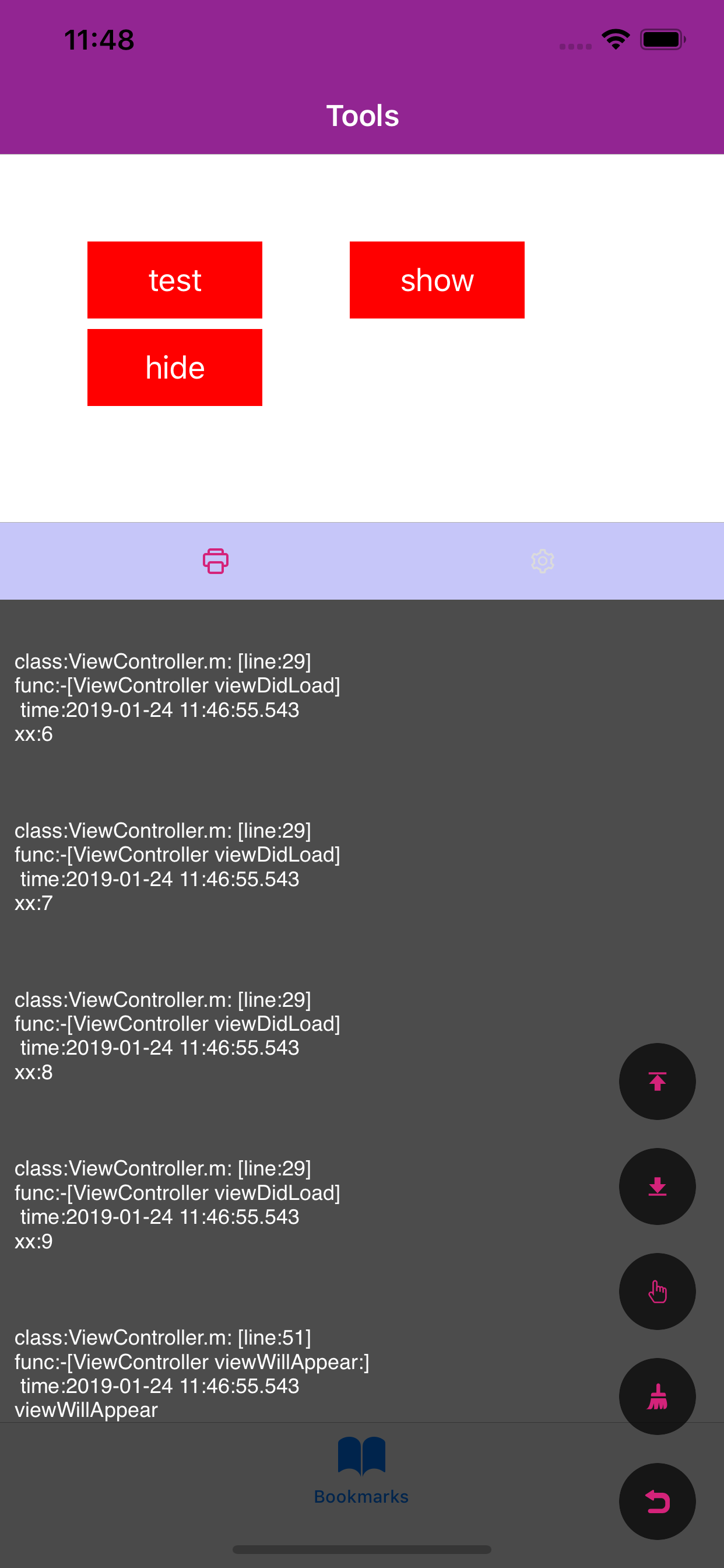
01、FLogConsoleManager 基础打印类
首先对于系统的NSLog,它是一个很耗性能的方法NSLog耗性能原因,所以在release模式下,是不应该使用的,而小工具也是无需在release模式下展示的。所以使用
1 | #ifdef DEBUG |
宏的使用与说明
知识点:attribute
__VA_ARGS__可变参数的宏,宏前面加上##的作用在于,当可变参数的个数为0时,这里的##起到把前面多余的”,”去掉,否则会编译出错。__FILE__宏在预编译时会替换成当前的源文件名__LINE__宏在预编译时会替换成当前的行号__FUNCTION__宏在预编译时会替换成当前的函数名称format能告诉编译器,代码在处理printf的内容NS_FORMAT_FUNCTION(1,2)参数列表,第1位是格式化字符串,从第二位参数开始计算参数列表
所以,改进一下上面的Log
1 | #define FLog(FORMAT, ...) fprintf(stderr,"\nFunction:%s Line:%d Content:%s\n", __FUNCTION__, __LINE__, [[NSString stringWithFormat:FORMAT, ##__VA_ARGS__] UTF8String]) |
使用
一个打印文件、函数、行数、参数的宏1
2
3
4
5
6
7
8
9
10
11
12
13
14
15
16
17#ifdef DEBUG
#define FLog(frmt, ...) Log_objc(frmt, ##__VA_ARGS__)
#else
#define FLog(frmt, ...)
#endif
#define Log_objc(frmt, ...) \
Log_func(__PRETTY_FUNCTION__, frmt, ##__VA_ARGS__)
#define Log_func(fnct,frmt,...) \
do{ if(1 & 1) Log(__FILE__, fnct, frmt, ##__VA_ARGS__); } while(0)
#define Log(file,fnct,frmt, ...) \
[[FLogConsoleManager shareInstance] logFile : file \
func : fnct \
line : __LINE__ \
format : (frmt), ##__VA_ARGS__]
02、文件管理类FLogFileManager (暂时弃用,会有一定卡顿)
文件安全性保证应该是多读单写的性质。另外需要了解的知识点有:
知识点:
- FileManager是对文件的操作,比如创建、移动、删除等
- FileHandle是对文件内容的操作,比如大小、追加字节等
- dispatch_barrier_async 虽然是异步执行,但是会保证之前的任务会先于当前任务执行,之后任务会后于当前任务执行。所以它只在并发队列中有效,其他队列和dispatch_async一样。简书
所以write的代码如下:
1 | __block BOOL isSuccess; |
文件监听
因为当level显示在窗口时需要实时显示日志的内容。而显示期间也有日志在不间断地写入到文件中,所以对文件内容变化的掌握能让level层永远显示最新的日志。
在当前demo中,有大概三种方式实现这个功能
1、在写入成功后发出通知,让level显示层主动调用读取日志的函数。
2、在level层写一个定时器,每隔一定时间进行日志的读取
3、使用GCD对文件内容进行监听,每当监听到内容变化时,发出信号
毫无疑问,最好的手法应该是第一种和第三种。这里为了学习一下新技能,所以使用第三种方法试一下。
知识点:
dispatch_source 事件源,可以捕捉系统底层事件发生。可以查看这位同学的简书进行了解1
2
3
4
5
6
7
8
9
10
11
12
13
14
15
16
17
18
19
20
21
22
23
24
25
26
27
28
29
30
31
32
33
34
35- (void)startMonitorFile {
NSURL *directoryURL = [NSURL URLWithString:[self path]];
int const fd =
open([[directoryURL path] fileSystemRepresentation], O_EVTONLY); //O_EVTONLY:仅为事件通知请求的描述符 notifications only */
if (fd < 0) {
NSLog(@"Unable to open the path = %@", [directoryURL path]);
return;
}
dispatch_source_t source =
dispatch_source_create(DISPATCH_SOURCE_TYPE_VNODE, fd,
DISPATCH_VNODE_WRITE,
DISPATCH_TARGET_QUEUE_DEFAULT); //创建事件源
__weak typeof(FLogFileManager *)weakself = self;
dispatch_source_set_event_handler(source, ^() { //监听信号回调
__strong typeof(FLogFileManager *)strongSelf = weakself;
unsigned long const type = dispatch_source_get_data(source);
switch (type) {
case DISPATCH_VNODE_WRITE: {
NSLog(@"目录内容改变!!!\n");
if (strongSelf.fileDidChanged){
strongSelf.fileDidChanged();
}
break;
}
default:
break;
}
});
dispatch_source_set_cancel_handler(source, ^{
close(fd);
});
self.source = source;
dispatch_resume(self.source);
}
02、内存缓存,解决缓存过多卡顿问题
1 | //将日志缓存到Arr里,写操作使用dispatch_barrier_async规避不安全问题 |
写入1
2
3
4
5
6
7
8
9
10
11
12
13
14
15
16
17
18
19dispatch_barrier_async(_syncQueue, ^{
NSString * fileStr = [[NSString stringWithUTF8String:file] lastPathComponent]; //file拿到的是文件路径
NSString * funcStr = [NSString stringWithUTF8String:func];
NSDateFormatter * format = [NSDateFormatter new];
format.dateFormat = @"yyyy-MM-dd HH:mm:ss.SSS";
NSString * timeStr = [format stringFromDate:[NSDate new]];
NSString * msgResult = [NSString stringWithFormat:@"\n class:%@: [line:%ld]\n func:%@\n time:%@\n %@\n\n",fileStr,line,funcStr,timeStr,msg];
//数量大于10就删除第一条
if (self.logArr.count >= 10) {
[self.logArr removeObjectAtIndex:0];
}
[self.logArr addObject:[NSString stringWithFormat:@"%@\n",msgResult]];
if (self.logDidChanged){
self.logDidChanged();
}
});
//对NSMutableArray的操作都应该考虑安全性问题1
2
3
4
5
6
7
8
9
10
11
12
13- (NSMutableArray<NSString *> *)getLogs {
__block NSMutableArray<NSString *> * tempArr;
dispatch_sync(_syncQueue, ^{
tempArr = [self.logArr mutableCopy];
});
return tempArr;
}
- (void)clearLog {
dispatch_barrier_async(_syncQueue, ^{
[self.logArr removeAllObjects];
});
}
03、使用
使用只要将FDebugTools文件夹导入就好,
日志打印直接使用:1
2
3FLog(@"viewDidLoad");
//或
FLog(@"%@",@"viewWillAppear");
显示窗口1
[[FLogLevel shareInstance] minShow];
隐藏窗口1
[[FLogLevel shareInstance] hide];
OK,基本日志系统就告一段落了,后续持续更新优化。
如果您喜欢或者觉得有帮助请给个小❤️❤️吧!